

Company info
Update your company display name and configure the email domains allowed to sign up for your company's MeetAndy account.
The Company info page lets Company Admin update the display name shown across MeetAndy and control which email domains are allowed to join the company.
Open it from Manage → Company info or visit hub.meetandy.ai/manage/settings.
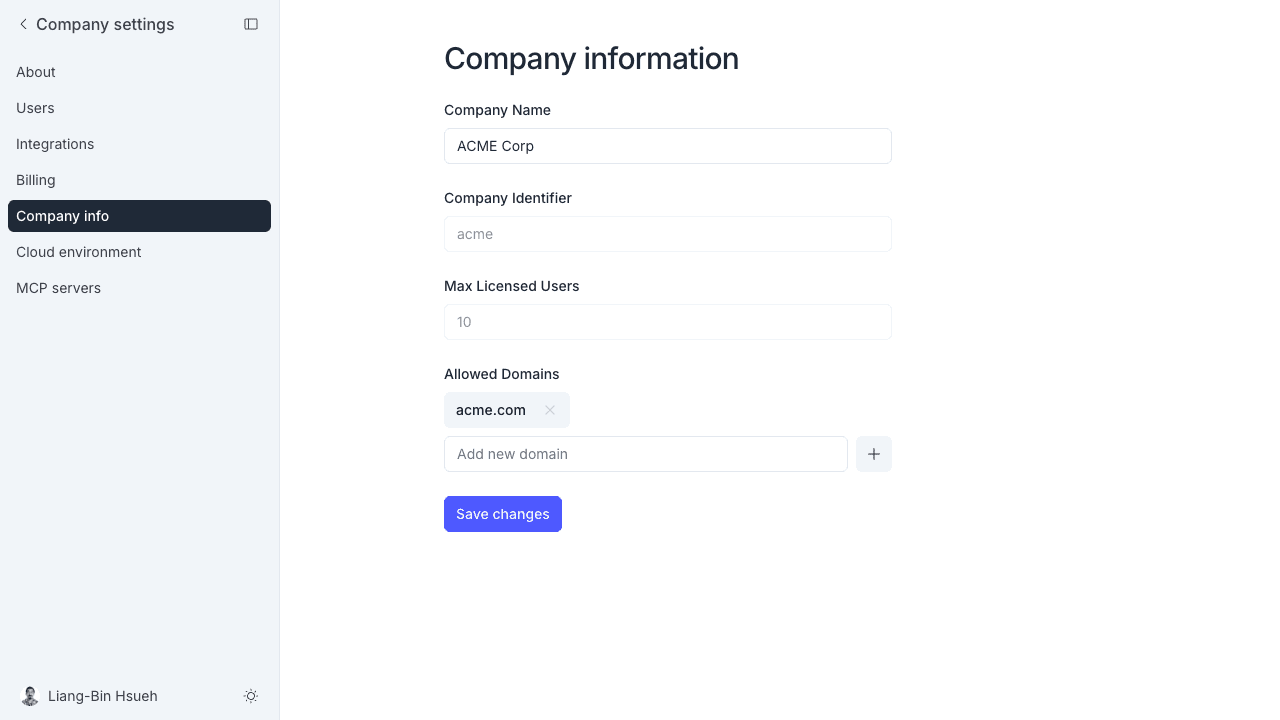
Company name
The Company Name field sets the name shown in the MeetAndy interface. Edit it and click Save changes.
Read-only fields
- Company Identifier — a short slug that uniquely identifies your company in MeetAndy. This cannot be changed.
- Max Licensed Users — the number of seats covered by your plan. To increase this, contact your account manager or go to Billing.
Allowed domains
Allowed domains control which email addresses can accept invitations and sign up for your company. If the list is empty, anyone with an invitation can join. If you add domains, only email addresses from those domains can accept an invite.
To add a domain:
- Type the domain (for example
acme.com) in the input field. - Click +.
- Click Save changes.
To remove a domain, click the × on the domain chip, then Save changes.
If you remove a domain that existing members use, those members are not affected. The restriction only applies to new invitations going forward.