

Tasks list
All your tasks across every Space, grouped by status.
The tasks list at /my-tasks shows every task assigned to you, across every Space you belong to. It's the fastest way to see what's waiting on you, what Andy is working on, and what's already done.
Layout
Tasks are grouped into collapsible sections by status. The most actionable groups are at the top and open by default; finished work is at the bottom and collapsed.
| Group | What's in it |
|---|---|
| Needs plan approval | Andy has finished planning and is waiting for you to approve before it starts coding |
| In review | Andy is waiting on you, either to approve the walkthrough so it can open the PR, or to review and merge a PR that's already open |
| Ready for PR | A short transitional state while Andy opens the pull/merge request |
| Implementing | Andy is actively writing code |
| Planning | Andy is figuring out the approach |
| Done | Merged or marked complete (collapsed by default) |
Each group has a count badge showing how many tasks it contains.
At a higher level, /my-tasks uses the same review / working / done layout as a Space's task list: tasks you need to review, tasks Andy is working on, and finished tasks. Active tasks show a live Working · 2m badge (a single-unit duration) so you can see at a glance how long Andy has been at it.
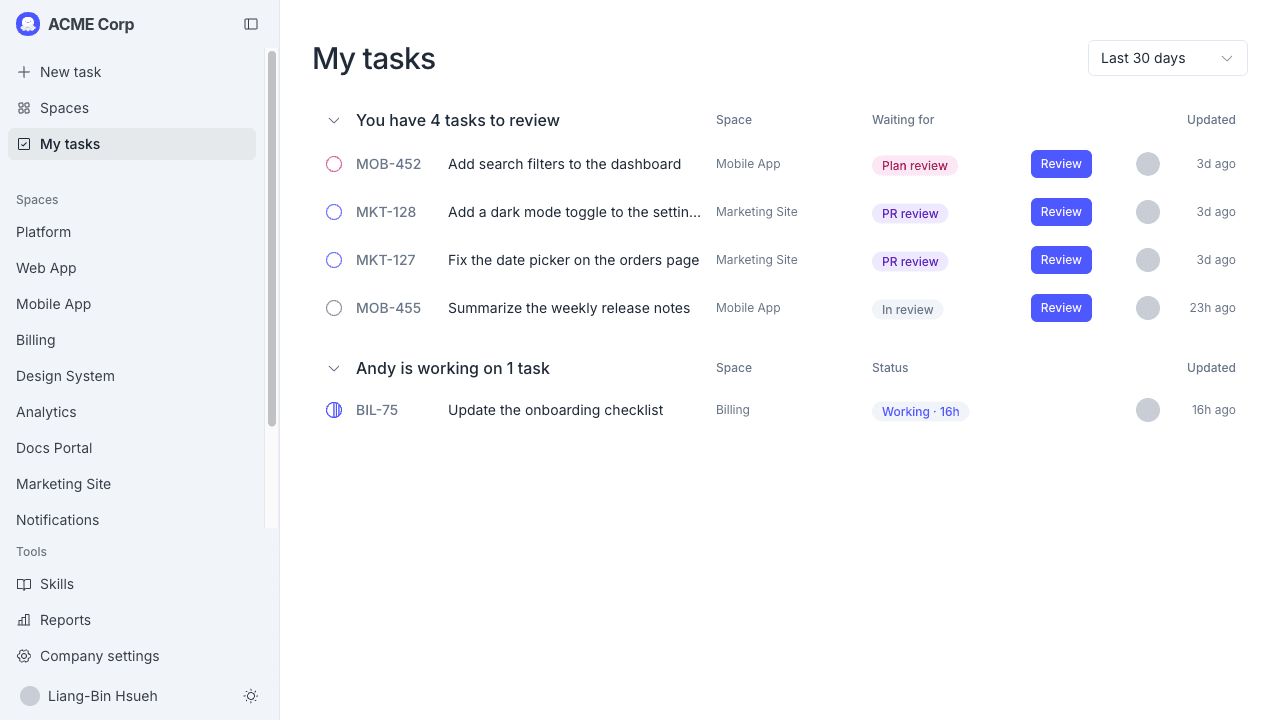
What each row shows
For each task you see:
- A status icon indicating where the task is in its lifecycle
- The task ID (e.g.,
PD-202) if the Space has a key configured - The task title
- The Space name the task belongs to
- A Review badge when the task needs your attention right now
- User avatars for the people involved (creator + members, up to three)
Click any row to open the task details page.
Filtering by date
A date range dropdown at the top lets you narrow the view:
- Last 30 days (default)
- Last 6 months
- Last 12 months
- All time
Empty state
If you don't have any tasks yet, the page shows: No tasks yet. Tasks assigned to you will appear here.
To create your first task, see Creating a task.
Tasks created from Slack
Tasks you start from a Slack mention show up here too. The Space column shows where they belong, and the task details page links back to the original Slack thread.