

Memory and context
How Andy remembers facts about your project.
Andy keeps a per-Space memory, a small set of project facts that carry across conversations. Memory makes Andy more useful over time: instead of re-explaining the same conventions every time, you say it once and it sticks.
How memory gets populated
There are two ways facts end up in memory:
- You ask Andy explicitly. Mention Andy with a "remember that…" phrase and Andy saves what you said.
- Andy learns from finished conversations. When a Slack thread wraps up, Andy reviews it and may save useful project facts on its own. This is on by default and can be turned off in Space settings → Memory → Save memories from chat history.
Memory does not keep every past message, plan, or PR. Those live in GitHub or Jira already. It's only the project facts worth remembering across conversations.
This means:
- ✅ "We use PostgreSQL 17 in production". Say "remember this" or let Andy pick it up automatically
- ✅ "Our brand color is #4A57FF". Same
- ❌ Past plans and PRs. Not in memory
- ❌ Every casual Q&A from weeks ago. Also not in memory
Adding to memory
In Slack, mention Andy with a remember phrase:
@MeetAndy remember that the project deadline is March 15th@MeetAndy remember we use Tailwind 4 with CSS-first configAndy replies confirming it added the fact to the Space's memory. If the new fact contradicts something already in memory, Andy notes the conflict and reconciles the entry.
Viewing and editing memory
Open the web app and go to Spaces → [your Space] → Settings → Memory.
You'll see:
- The current memory document, which anyone in the Space can read
- An edit button to change facts directly
- A revision history showing who changed what, with diffs, so you can see how memory has evolved
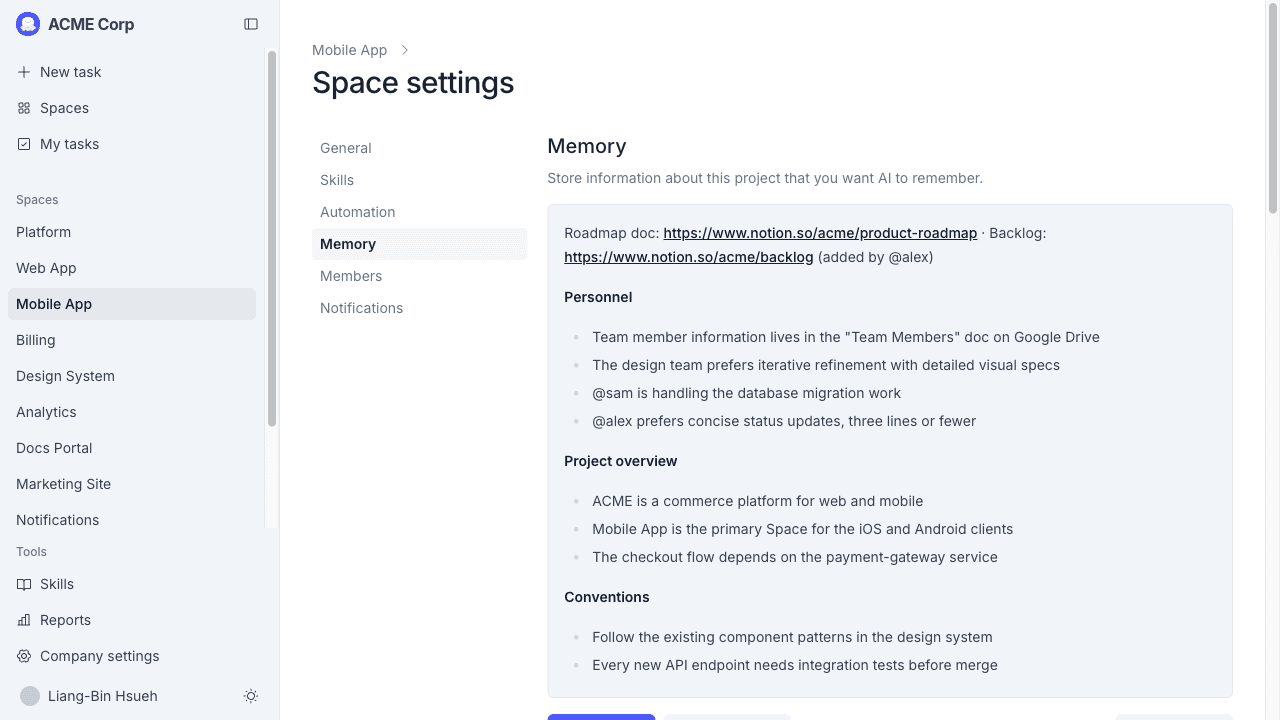
Anyone in the Space can edit memory through this page. There's no "delete this fact" command in Slack. To remove something, edit the memory document and save.
What Andy uses memory for
Whenever you mention Andy in Slack, whether to ask, plan, or hand off implementation, Andy reads the Space's memory as part of its context. So a fact you taught Andy six weeks ago still influences how Andy answers today.
Tips
- Memory is per-Space. Facts you save in the
acme-productSpace don't carry over toacme-internal-tools. Save the same fact in both Spaces if it applies to both. - Keep memory short and concrete. "We use Postgres 17" is useful. "We try our best to write good code" is not.
- Memory is shared across the team. Don't put anything sensitive in there. Anyone in the Space sees it.
- Auto-capture can be turned off. If you'd rather Andy not learn from chat history, toggle off Save memories from chat history in the Memory tab.